
Vox Seas Codes & How to Redeem
Try six reported Vox Seas codes for Stat Reset Tokens, Gold and double XP. Redeem them in the Codes box of the Settings menu, then check the confirmation before using your rewards.
Codes and reported rewards
Reviewed November 23, 2026 (Asia/Shanghai). The six entries below come from a Beebom report updated on November 23, 2026. ArcadeWiki has not redeemed them in-game, so rewards and availability may differ on your account.
| Code | Reported reward |
|---|---|
175KLIKES | 1 Stat Reset Token |
THX200K | 30 minutes of double XP |
Patch2Reset | 1 Stat Reset Token |
PatchGold | 20,000 Gold |
PatchReset | 1 Stat Reset Token |
Release2026 | 1 hour of double XP |
How to redeem Vox Seas codes
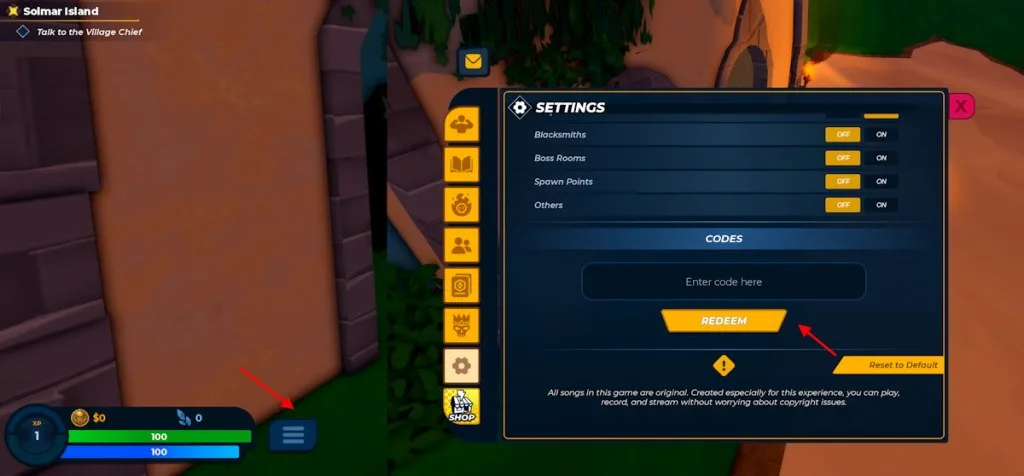
Codes are entered in the Settings menu, not in the Shop. The reviewed report lists no group or level requirement. Menu placement can change after an update.
- Launch Vox Seas from Roblox.
- Select the three-line menu button at the bottom left, next to your level and health bars.
- Open Settings with the cog icon in the menu's side tabs.
- Scroll down to the Codes section and paste one code into the Enter code here box.
- Select Redeem, then check the confirmation and your Gold, XP boost or token count before entering another code.
Enter each code exactly
Several codes mix capital and lower-case letters, such as Patch2Reset and Release2026. Copy them from the table instead of retyping, and do not add spaces, quotation marks or labels such as NEW.
Use a Stat Reset Token after you have decided on a new build, and start a double XP boost when you have time to keep questing, since the boosts are timed.
Expired Vox Seas codes
These codes are reported expired and are kept for reference only. The source does not list their old rewards.
| Expired code | Status |
|---|---|
| BugFix4 | Expired |
| BugFix3 | Expired |
| BugFix2 | Expired |
| BugFix1 | Expired |
| Release | Expired |
Why is my Vox Seas code not working?
These checks are practical suggestions, not errors reproduced by ArcadeWiki.
| What happened | What to check |
|---|---|
| The code is rejected | Check capitalization, remove extra spaces and see whether the code is in the expired table. |
| Already claimed | This account may have used the code earlier; a second claim is not expected to give another reward. |
| You cannot find the box | Open the menu at the bottom left, select the cog for Settings and scroll to the bottom. |
| The reward seems missing | Double XP is a timed boost and a Stat Reset Token is spent on stats, so check the matching menu rather than your cash. |
Where to find new Vox Seas codes
The official Roblox description said the next code would arrive at 200K likes when we reviewed it, so liking the game helps the community reach that milestone. Announcements are also posted in the Vox Seas! Roblox group and the official Discord server.
Names such as 175KLIKES and THX200K suggest codes tied to like and milestone counts, which is an editorial observation rather than a guarantee. Codes can expire without warning.
Sources and review scope
Reviewed November 23, 2026. The Roblox experience page establishes the game's identity, publisher group and the 200K-likes code note. Code strings, rewards, the expired list and the redemption screenshot follow a Beebom report showing an update date of November 23, 2026.
The review date is not an in-game testing date.